 lan
lan
191 lines
6.4 KiB
Markdown
191 lines
6.4 KiB
Markdown
<div align="center">
|
|
<h1>FileCodeBox-Lite</h1>
|
|
<h2>FileCodeBox-Lite</h2>
|
|
<p><em>Share texts and files anonymously with passwords, just like picking up a package</em></p>
|
|
<p>Join our QQ group: 739673698</p>
|
|
</div>
|
|
|
|

|
|
|
|
---
|
|
|
|
[Simplified Chinese](./readme.md) | [English](./readme_en.md)
|
|
|
|
## Main Features
|
|
|
|
- [x] **Lightweight:** Built with FastAPI + Sqlite3 + Vue2 + ElementUI
|
|
- [x] **Easy Upload:** Support copy-paste and drag-and-drop selection
|
|
- [x] **Various Types:** Supports text and file sharing
|
|
- [x] **Brute-force Protection:** Error limit on passwords
|
|
- [x] **Abuse Prevention:** IP limits on upload attempts
|
|
- [x] **Password Sharing:** Random password for accessing files, customizable access counts, and expiration
|
|
- [x] **Internationalization:** Supports both Chinese and English
|
|
- [x] **Anonymous Sharing:** No need for registration or login
|
|
- [x] **Management Panel:** View and delete files
|
|
- [x] **One-Click Deployment:** Support for Docker deployment
|
|
- [x] **Free Extension:** Supports S3 protocol and local file stream; can add new storage engines in storage file as needed
|
|
- [x] **Simple and Clear:** Great for beginners
|
|
- [x] **Terminal Download:** Terminal command `wget https://share.lanol.cn/share/select?code=83432`
|
|
|
|
## Deployment Methods
|
|
|
|
### 1Panel One-Click Deployment
|
|
|
|
Go to Application Store -> Utilities -> FileCodeBox
|
|

|
|
**Update:** Container -> Select -> More -> Edit -> Force Pull Image -> Confirm
|
|
|
|
### One-Click Deployment in BaoTa Application Store
|
|
|
|
Current version is 1.6
|
|

|
|
|
|
### Docker One-Click Deployment
|
|
|
|
**Version 2.0**, work in progress
|
|
|
|
Default Info
|
|
|
|
Backend Address: `/#/admin`
|
|
|
|
Admin Password: `FileCodeBox2023`
|
|
|
|
*Supports AMD & ARM*
|
|
|
|
**One-Click Install**
|
|
|
|
```bash
|
|
docker run -d --restart=always -p 12345:12345 -v /opt/FileCodeBox/:/app/data --name filecodebox lanol/filecodebox:beta
|
|
```
|
|
|
|
**One-Click Update**
|
|
|
|
```bash
|
|
docker pull lanol/filecodebox:beta && docker stop filecodebox && docker rm filecodebox && docker run -d --restart=always -p 12345:12345 -v /opt/FileCodeBox/:/app/data --name filecodebox lanol/filecodebox:beta
|
|
```
|
|
|
|
**Version 1.6 AMD**
|
|
|
|
```bash
|
|
docker run -d --restart=always -p 12345:12345 -v /opt/FileCodeBox/:/app/data --name filecodebox lanol/filecodebox:latest
|
|
```
|
|
|
|
**Version 1.6 ARM**
|
|
|
|
```bash
|
|
docker run -d --restart=always -p 12345:12345 -v /opt/FileCodeBox/:/app/data --name filecodebox lanol/filecodebox:arm
|
|
```
|
|
|
|
### Update Methods
|
|
|
|
```bash
|
|
// Update the container
|
|
docker pull lanol/filecodebox:beta
|
|
// Stop and remove the container
|
|
docker stop filecodebox && docker rm filecodebox
|
|
// Re-run the container
|
|
docker run -d --restart=always -p 12345:12345 -v /opt/FileCodeBox/:/app/data --name filecodebox lanol/filecodebox:latest
|
|
```
|
|
|
|
### Notes on Version 1.6
|
|
|
|
This version has significant changes. If issues occur, try clearing the /opt/FileCodeBox directory. Feel free to provide feedback. **Note:** For first-time installations, check Docker logs for the initial password and backend address, as shown below:
|
|
|
|
```bash
|
|
docker logs filecodebox
|
|
```
|
|
|
|
**Backend Local File List**: Move server files to the /opt/FileCodeBox/data/locals directory for display.
|
|
|
|
## Preview
|
|
|
|
### Example Site
|
|
|
|
[https://share.lanol.cn](https://share.lanol.cn)
|
|
|
|
### Screenshots
|
|
|
|
<table style="width:100%">
|
|
<tr style="width: 100%">
|
|
<td style="width: 50%"><img src="./.github/images/img.png" alt="File Sharing"></td>
|
|
<td style="width: 50%"><img src="./.github/images/img_1.png" alt="File Sharing"></td>
|
|
</tr>
|
|
<tr style="width: 100%">
|
|
<td style="width: 50%"><img src="./.github/images/img_2.png" alt="File Sharing"></td>
|
|
<td style="width: 50%"><img src="./.github/images/img_3.png" alt="File Sharing"></td>
|
|
</tr>
|
|
<tr style="width: 100%">
|
|
<td style="width: 50%"><img src="./.github/images/img_4.png" alt="File Sharing"></td>
|
|
<td style="width: 50%"><img src="./.github/images/img_5.png" alt="File Sharing"></td>
|
|
</tr>
|
|
</table>
|
|
|
|
## Configuration File (for versions 1.7 and below)
|
|
|
|
To modify the configuration, save the following content as a `.env` file in the `/opt/FileCodeBox/` directory, then restart the container. If not using Docker, create a `data` folder in the project directory and place the `.env` file inside.
|
|
|
|
```dotenv
|
|
# Port
|
|
PORT=12345
|
|
# Sqlite database file
|
|
DATABASE_URL=sqlite+aiosqlite:///database.db
|
|
# Static folder
|
|
DATA_ROOT=./static
|
|
# Static folder URL
|
|
STATIC_URL=/static
|
|
# Enable uploads
|
|
ENABLE_UPLOAD=True
|
|
# Error limit
|
|
ERROR_COUNT=5
|
|
# Error limit in minutes
|
|
ERROR_MINUTE=10
|
|
# Upload limit
|
|
UPLOAD_COUNT=60
|
|
# Upload limit in minutes
|
|
UPLOAD_MINUTE=1
|
|
# Interval for deleting expired files (in minutes)
|
|
DELETE_EXPIRE_FILES_INTERVAL=10
|
|
# Admin address
|
|
ADMIN_ADDRESS=admin
|
|
# Admin password
|
|
ADMIN_PASSWORD=admin
|
|
# File size limit, default 10MB
|
|
FILE_SIZE_LIMIT=10
|
|
# Website title
|
|
TITLE=FileCodeBox
|
|
# Website description
|
|
DESCRIPTION=FileCodeBox, file delivery cabinet, password transfer box, anonymous password sharing of text, files, images, videos, audio, compressed files, and other types of files
|
|
# Website keywords
|
|
KEYWORDS=FileCodeBox, file delivery cabinet, password transfer box, anonymous password sharing of text, files, images, videos, audio, compressed files, and other types of files
|
|
# Storage engine
|
|
STORAGE_ENGINE=filesystem
|
|
# If using Alibaba Cloud OSS service, create these additional parameters:
|
|
# Alibaba Cloud Account AccessKey
|
|
KeyId=Alibaba Cloud Account AccessKey
|
|
# Alibaba Cloud Account AccessKeySecret
|
|
KeySecret=Alibaba Cloud Account AccessKeySecret
|
|
# Alibaba Cloud OSS Bucket region node
|
|
OSS_ENDPOINT=Alibaba Cloud OSS Bucket region node
|
|
# Alibaba Cloud OSS Bucket name
|
|
BUCKET_NAME=Alibaba Cloud OSS Bucket name
|
|
```
|
|
|
|
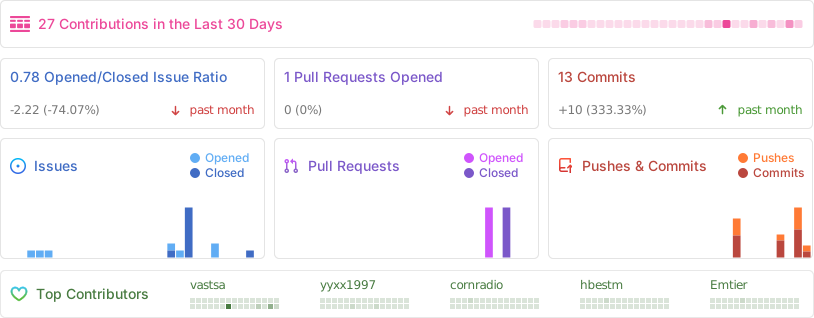
## Status
|
|
|
|
|
|
|
|
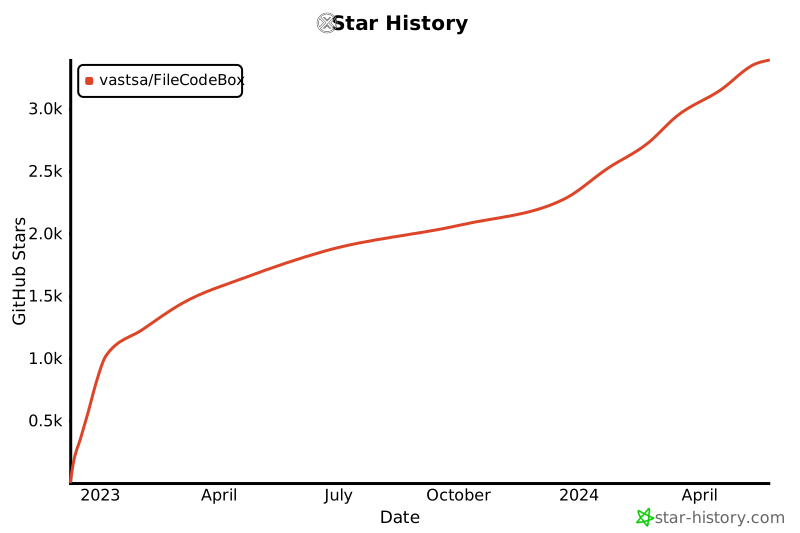
## Star History
|
|
|
|
[](https://star-history.com/#vastsa/FileCodeBox&Date)
|
|
|
|
## Frequently Asked Questions (FAQ)
|
|
|
|
1. *413 Request Entity Too Large*:
|
|
Nginx limit resolution:
|
|
Open your host's `nginx.conf` configuration file, locate it,
|
|
Add `client_max_body_size 10m;` within the `http{}` block,
|
|
Then restart Nginx.
|
|
|
|
## Disclaimer
|
|
|
|
This project is open-source and intended for learning purposes only. Do not use it for any illegal activities; any consequences are your own responsibility and unrelated to the author. Please retain the project address when using, thank you. |