 Lan
LanFileCodeBox

Share text and files anonymously with a passcode, like picking up a package






简体中文 | Deployment Guide | FAQ
📝 Introduction
FileCodeBox is a lightweight file sharing tool developed with FastAPI + Vue3. It allows users to share text and files easily, where recipients only need a passcode to retrieve the files, just like picking up a package from a delivery locker.
🖼️ Preview



New Interface
 |
 |
 |
 |
 |
 |
 |
 |
Classic Interface
 |
 |
 |
 |
 |
 |
🎯 Use Cases
📁 Temporary File SharingQuick file sharing without registration |
📝 Quick Text SharingShare code snippets and text content |
🕶️ Anonymous TransferPrivacy-protected file transfer |
💾 Temporary StorageFile storage with expiration time |
🔄 Cross-platform TransferQuick file transfer between devices |
🌐 Private Share ServiceBuild your own file sharing service |
✨ Core Features
🚀 LightweightBased on FastAPI + SQLite3 + Vue3 + ElementUI |
📤 Easy UploadSupport copy-paste and drag-drop |
📦 Multiple TypesSupport text and various file types |
🔒 Security
|
🎫 Passcode SharingRandom codes with customizable limits |
🌍 Multi-languageSupport for Simplified Chinese, Traditional Chinese, and English |
🎭 AnonymousNo registration required |
🛠 Admin PanelFile and system management |
🐳 DockerOne-click deployment |
💾 Storage OptionsLocal, S3, OneDrive support |
📱 ResponsiveMobile-friendly design |
💻 CLI SupportCommand-line download |
🚀 Quick Start
Docker Deployment
docker run -d --restart=always -p 12345:12345 -v /opt/FileCodeBox/:/app/data --name filecodebox lanol/filecodebox:beta
Manual Deployment
- Clone the repository
git clone https://github.com/vastsa/FileCodeBox.git
- Install dependencies
cd FileCodeBox
pip install -r requirements.txt
- Start the service
python main.py
📖 Usage Guide
Share Files
- Open the website, click "Share File"
- Select or drag files
- Set expiration time and count
- Get the passcode
Retrieve Files
- Open the website, enter passcode
- Click retrieve
- Download file or view text
Admin Panel
- Visit
/admin - Enter admin password
- Manage files and settings
🛠 Development Guide
Project Structure
FileCodeBox/
├── apps/           # Application code
│   ├── admin/     # Admin backend
│   └── base/      # Base functions
├── core/          # Core functions
├── data/          # Data directory
└── fcb-fronted/   # Frontend code
Development Environment
- Python 3.8+
- Node.js 14+
- Vue 3
- FastAPI
Local Development
- Backend development
python main.py
- Frontend development
cd fcb-fronted
npm install
npm run dev
🤝 Contributing
- Fork the project
- Create your feature branch
git checkout -b feature/xxx - Commit your changes
git commit -m 'Add xxx' - Push to the branch
git push origin feature/xxx - Open a Pull Request
❓ FAQ
Q: How to modify upload size limit?
A: Change uploadSize in admin panel
Q: How to configure storage engine?
A: Select storage engine and configure parameters in admin panel
Q: How to backup data?
A: Backup the data directory
For more questions, visit Wiki
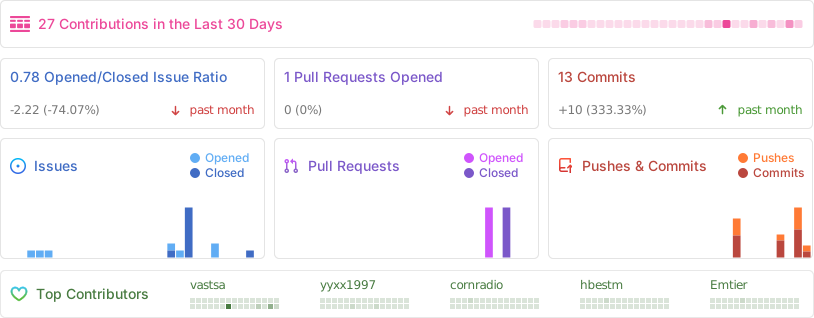
�� Project Statistics and Analytics
📜 Disclaimer
This project is open-source for learning purposes only. It should not be used for any illegal purposes. The author is not responsible for any consequences. Please retain the project address and copyright information when using it.