 Lan
Lan
472 lines
12 KiB
Markdown
472 lines
12 KiB
Markdown
<div align="center">
|
||
|
||
# FileCodeBox
|
||
|
||
### 文件快递柜 - 匿名口令分享文本和文件
|
||
|
||
<img src="https://fastly.jsdelivr.net/gh/vastsa/FileCodeBox@V1.6/static/banners/img_1.png" alt="FileCodeBox Logo" width="400">
|
||
|
||
像拿快递一样取文件,无需注册,输入口令即可获取
|
||
|
||
[](https://github.com/vastsa/FileCodeBox/stargazers)
|
||
[](https://github.com/vastsa/FileCodeBox/network)
|
||
[](https://github.com/vastsa/FileCodeBox/issues)
|
||
[](https://github.com/vastsa/FileCodeBox/blob/master/LICENSE)
|
||
[](https://hub.docker.com/r/lanol/filecodebox)
|
||
|
||
[](https://www.python.org)
|
||
[](https://fastapi.tiangolo.com)
|
||
[](https://vuejs.org)
|
||
|
||
[English](./readme_en.md) | [在线演示](https://share.lanol.cn) | [部署教程](https://github.com/vastsa/FileCodeBox/wiki/部署教程) | [常见问题](https://github.com/vastsa/FileCodeBox/wiki/常见问题) | [QQ群: 739673698](https://qm.qq.com/q/PemPzhdEIM)
|
||
|
||
```bash
|
||
# 🚀 一键部署
|
||
docker run -d -p 12345:12345 -v /opt/FileCodeBox:/app/data --name filecodebox lanol/filecodebox:latest
|
||
# 国内镜像(如果上面拉取缓慢): docker.cnb.cool/aixk/filecodebox
|
||
```
|
||
|
||
</div>
|
||
|
||
---
|
||
|
||
## 目录
|
||
|
||
- [项目简介](#-项目简介)
|
||
- [功能特性](#-功能特性)
|
||
- [界面预览](#-界面预览)
|
||
- [快速开始](#-快速开始)
|
||
- [使用指南](#-使用指南)
|
||
- [开发指南](#-开发指南)
|
||
- [常见问题](#-常见问题)
|
||
- [贡献指南](#-贡献指南)
|
||
- [项目统计](#-项目统计)
|
||
- [免责声明](#-免责声明)
|
||
|
||
---
|
||
|
||
## 📝 项目简介
|
||
|
||
FileCodeBox 是一个轻量级的文件分享工具,基于 **FastAPI + Vue3** 开发。用户可以通过简单的方式匿名分享文本和文件,接收者只需输入提取码即可获取内容——就像从快递柜取出快递一样简单。
|
||
|
||
### 应用场景
|
||
|
||
| 场景 | 描述 |
|
||
|------|------|
|
||
| 📁 **临时文件分享** | 快速分享文件,无需注册登录 |
|
||
| 📝 **代码片段分享** | 分享代码、配置文件等文本内容 |
|
||
| 🕶️ **匿名文件传输** | 保护隐私的点对点传输 |
|
||
| 🔄 **跨设备传输** | 在不同设备间快速同步文件 |
|
||
| 💾 **临时存储** | 支持自定义过期时间的云存储 |
|
||
| 🌐 **私有服务** | 搭建企业或个人专属分享服务 |
|
||
|
||
---
|
||
|
||
## ✨ 功能特性
|
||
|
||
<table>
|
||
<tr>
|
||
<td width="33%" valign="top">
|
||
|
||
### 🚀 轻量高效
|
||
- FastAPI + SQLite3 后端
|
||
- Vue3 + Element Plus 前端
|
||
- Docker 一键部署
|
||
- 资源占用极低
|
||
|
||
</td>
|
||
<td width="33%" valign="top">
|
||
|
||
### 🔒 安全可靠
|
||
- IP 上传频率限制
|
||
- 提取码错误次数限制
|
||
- 文件自动过期清理
|
||
- 支持管理员认证
|
||
|
||
</td>
|
||
<td width="33%" valign="top">
|
||
|
||
### 📤 便捷上传
|
||
- 拖拽上传
|
||
- 复制粘贴上传
|
||
- 命令行 curl 上传
|
||
- 批量文件上传
|
||
|
||
</td>
|
||
</tr>
|
||
<tr>
|
||
<td width="33%" valign="top">
|
||
|
||
### 🎫 灵活分享
|
||
- 随机/自定义提取码
|
||
- 可设置有效期(时间/次数)
|
||
- 支持永久有效
|
||
- 文本和文件统一管理
|
||
|
||
</td>
|
||
<td width="33%" valign="top">
|
||
|
||
### 💾 多存储支持
|
||
- 本地文件系统
|
||
- S3 兼容存储
|
||
- [OneDrive](./docs/guide/storage-onedrive.md)
|
||
- [OpenDAL](./docs/guide/storage-opendal.md)
|
||
|
||
</td>
|
||
<td width="33%" valign="top">
|
||
|
||
### 🌍 国际化
|
||
- 简体中文
|
||
- 繁体中文
|
||
- English
|
||
- 响应式设计 / 深色模式
|
||
|
||
</td>
|
||
</tr>
|
||
</table>
|
||
|
||
---
|
||
|
||
## 🖼️ 界面预览
|
||
|
||
> 前端源码仓库:[2024主题](https://github.com/vastsa/FileCodeBoxFronted) | [2023主题](https://github.com/vastsa/FileCodeBoxFronted2023)
|
||
|
||
<details open>
|
||
<summary><b>🎨 新版界面 (2024)</b></summary>
|
||
<br>
|
||
<div align="center">
|
||
<table>
|
||
<tr>
|
||
<td><img src="./.github/images/img_7.png" alt="文件上传"></td>
|
||
<td><img src="./.github/images/img_8.png" alt="文本分享"></td>
|
||
</tr>
|
||
<tr>
|
||
<td><img src="./.github/images/img_10.png" alt="文件管理"></td>
|
||
<td><img src="./.github/images/img_9.png" alt="系统设置"></td>
|
||
</tr>
|
||
<tr>
|
||
<td><img src="./.github/images/img_11.png" alt="移动端"></td>
|
||
<td><img src="./.github/images/img_12.png" alt="深色模式"></td>
|
||
</tr>
|
||
</table>
|
||
</div>
|
||
</details>
|
||
|
||
<details>
|
||
<summary><b>📦 经典界面 (2023)</b></summary>
|
||
<br>
|
||
<div align="center">
|
||
<table>
|
||
<tr>
|
||
<td><img src="./.github/images/img.png" alt="首页"></td>
|
||
<td><img src="./.github/images/img_1.png" alt="上传"></td>
|
||
</tr>
|
||
<tr>
|
||
<td><img src="./.github/images/img_2.png" alt="管理"></td>
|
||
<td><img src="./.github/images/img_3.png" alt="设置"></td>
|
||
</tr>
|
||
</table>
|
||
</div>
|
||
</details>
|
||
|
||
---
|
||
|
||
## 🚀 快速开始
|
||
|
||
### Docker 部署(推荐)
|
||
|
||
**方式一:Docker CLI**
|
||
|
||
```bash
|
||
# Docker Hub(推荐)
|
||
docker run -d --restart always -p 12345:12345 -v /opt/FileCodeBox:/app/data --name filecodebox lanol/filecodebox:latest
|
||
|
||
# 国内镜像(如果 Docker Hub 拉取缓慢)
|
||
docker run -d --restart always -p 12345:12345 -v /opt/FileCodeBox:/app/data --name filecodebox docker.cnb.cool/aixk/filecodebox
|
||
```
|
||
|
||
**方式二:Docker Compose**
|
||
|
||
```yaml
|
||
services:
|
||
filecodebox:
|
||
image: lanol/filecodebox:latest
|
||
container_name: filecodebox
|
||
restart: unless-stopped
|
||
ports:
|
||
- "12345:12345"
|
||
volumes:
|
||
- ./data:/app/data
|
||
environment:
|
||
- WORKERS=4
|
||
- LOG_LEVEL=info
|
||
```
|
||
|
||
```bash
|
||
docker compose up -d
|
||
```
|
||
|
||
**环境变量说明**
|
||
|
||
| 变量 | 默认值 | 说明 |
|
||
|------|--------|------|
|
||
| `HOST` | `::` | 监听地址(支持 IPv4/IPv6 双栈) |
|
||
| `PORT` | `12345` | 服务端口 |
|
||
| `WORKERS` | `4` | 工作进程数(建议设为 CPU 核心数) |
|
||
| `LOG_LEVEL` | `info` | 日志级别:`debug` / `info` / `warning` / `error` |
|
||
|
||
### 反向代理配置
|
||
|
||
使用 Nginx 时,请添加以下配置以正确获取客户端 IP:
|
||
|
||
```nginx
|
||
location / {
|
||
proxy_pass http://127.0.0.1:12345;
|
||
proxy_set_header Host $host;
|
||
proxy_set_header X-Real-IP $remote_addr;
|
||
proxy_set_header X-Forwarded-For $proxy_add_x_forwarded_for;
|
||
proxy_set_header X-Forwarded-Proto $scheme;
|
||
client_max_body_size 100m; # 根据需要调整上传大小限制
|
||
}
|
||
```
|
||
|
||
### 手动部署
|
||
|
||
```bash
|
||
# 1. 克隆项目
|
||
git clone https://github.com/vastsa/FileCodeBox.git
|
||
cd FileCodeBox
|
||
|
||
# 2. 安装依赖
|
||
pip install -r requirements.txt
|
||
|
||
# 3. 启动服务
|
||
python main.py
|
||
```
|
||
|
||
---
|
||
|
||
## 📖 使用指南
|
||
|
||
### 基础操作
|
||
|
||
| 操作 | 步骤 |
|
||
|------|------|
|
||
| **分享文件** | 打开网页 → 选择/拖拽文件 → 设置有效期 → 获取提取码 |
|
||
| **获取文件** | 打开网页 → 输入提取码 → 下载文件或查看文本 |
|
||
| **管理后台** | 访问 `/#/admin` → 输入密码 `FileCodeBox2023` |
|
||
|
||
### 命令行使用(curl)
|
||
|
||
<details>
|
||
<summary><b>点击展开 curl 使用示例</b></summary>
|
||
|
||
**上传文件**
|
||
|
||
```bash
|
||
# 基础上传(默认 1 天有效期)
|
||
curl -X POST "http://localhost:12345/share/file/" \
|
||
-F "file=@/path/to/file.txt"
|
||
|
||
# 指定 1 小时有效期
|
||
curl -X POST "http://localhost:12345/share/file/" \
|
||
-F "file=@/path/to/file.txt" \
|
||
-F "expire_value=1" \
|
||
-F "expire_style=hour"
|
||
|
||
# 指定下载 10 次后过期
|
||
curl -X POST "http://localhost:12345/share/file/" \
|
||
-F "file=@/path/to/file.txt" \
|
||
-F "expire_value=10" \
|
||
-F "expire_style=count"
|
||
```
|
||
|
||
**分享文本**
|
||
|
||
```bash
|
||
curl -X POST "http://localhost:12345/share/text/" \
|
||
-F "text=要分享的文本内容"
|
||
```
|
||
|
||
**下载文件**
|
||
|
||
```bash
|
||
curl -L "http://localhost:12345/share/select/?code=提取码" -o filename
|
||
```
|
||
|
||
**有效期参数**
|
||
|
||
| `expire_style` | 说明 |
|
||
|----------------|------|
|
||
| `day` | 天数 |
|
||
| `hour` | 小时 |
|
||
| `minute` | 分钟 |
|
||
| `count` | 下载次数 |
|
||
| `forever` | 永久有效 |
|
||
|
||
**返回示例**
|
||
|
||
```json
|
||
{
|
||
"code": 200,
|
||
"msg": "success",
|
||
"detail": {
|
||
"code": "abcd1234",
|
||
"name": "file.txt"
|
||
}
|
||
}
|
||
```
|
||
|
||
**需要认证时**(管理员关闭游客上传后)
|
||
|
||
```bash
|
||
# 1. 获取 token
|
||
curl -X POST "http://localhost:12345/admin/login" \
|
||
-H "Content-Type: application/json" \
|
||
-d '{"password": "FileCodeBox2023"}'
|
||
|
||
# 2. 携带 token 上传
|
||
curl -X POST "http://localhost:12345/share/file/" \
|
||
-H "Authorization: Bearer <token>" \
|
||
-F "file=@/path/to/file.txt"
|
||
```
|
||
|
||
</details>
|
||
|
||
---
|
||
|
||
## 🛠 开发指南
|
||
|
||
### 项目结构
|
||
|
||
```
|
||
FileCodeBox/
|
||
├── apps/ # 应用模块
|
||
│ ├── admin/ # 管理后台
|
||
│ └── base/ # 基础功能
|
||
├── core/ # 核心模块
|
||
├── data/ # 数据目录(运行时生成)
|
||
├── docs/ # 文档
|
||
└── main.py # 入口文件
|
||
```
|
||
|
||
### 本地开发
|
||
|
||
**后端**
|
||
|
||
```bash
|
||
pip install -r requirements.txt
|
||
python main.py
|
||
```
|
||
|
||
**前端**
|
||
|
||
```bash
|
||
# 前端仓库: https://github.com/vastsa/FileCodeBoxFronted
|
||
cd fcb-fronted
|
||
npm install
|
||
npm run dev
|
||
```
|
||
|
||
### 技术栈
|
||
|
||
| 类别 | 技术 |
|
||
|------|------|
|
||
| **后端框架** | FastAPI 0.128+ / Uvicorn |
|
||
| **数据库** | SQLite + Tortoise ORM |
|
||
| **数据验证** | Pydantic 2.x |
|
||
| **异步支持** | aiofiles / aiohttp / aioboto3 |
|
||
| **对象存储** | S3 协议 / OneDrive / OpenDAL |
|
||
| **前端框架** | Vue 3 + Element Plus + Vite |
|
||
| **运行环境** | Python 3.8+ / Node.js 18+ |
|
||
| **容器化** | Docker / Docker Compose |
|
||
|
||
---
|
||
|
||
## ❓ 常见问题
|
||
|
||
<details>
|
||
<summary><b>如何修改上传大小限制?</b></summary>
|
||
|
||
在管理面板中修改 `uploadSize` 配置项。如果使用 Nginx 反向代理,还需修改 `client_max_body_size`。
|
||
</details>
|
||
|
||
<details>
|
||
<summary><b>如何配置存储引擎?</b></summary>
|
||
|
||
在管理面板中选择存储引擎类型并配置相应参数。支持本地存储、S3、OneDrive、OpenDAL 等。
|
||
</details>
|
||
|
||
<details>
|
||
<summary><b>如何备份数据?</b></summary>
|
||
|
||
备份 `data` 目录即可,包含数据库和上传的文件。
|
||
</details>
|
||
|
||
<details>
|
||
<summary><b>如何修改管理员密码?</b></summary>
|
||
|
||
登录管理面板后,在系统设置中修改 `adminPassword` 配置项。
|
||
</details>
|
||
|
||
更多问题请访问 [Wiki](https://github.com/vastsa/FileCodeBox/wiki/常见问题) 或加入 [QQ群: 739673698](https://qm.qq.com/q/PemPzhdEIM)
|
||
|
||
---
|
||
|
||
## 🤝 贡献指南
|
||
|
||
欢迎提交 Issue 和 Pull Request!
|
||
|
||
```bash
|
||
# 1. Fork 并克隆
|
||
git clone https://github.com/your-username/FileCodeBox.git
|
||
|
||
# 2. 创建分支
|
||
git checkout -b feature/your-feature
|
||
|
||
# 3. 提交更改
|
||
git commit -m "feat: add your feature"
|
||
|
||
# 4. 推送并创建 PR
|
||
git push origin feature/your-feature
|
||
```
|
||
|
||
---
|
||
|
||
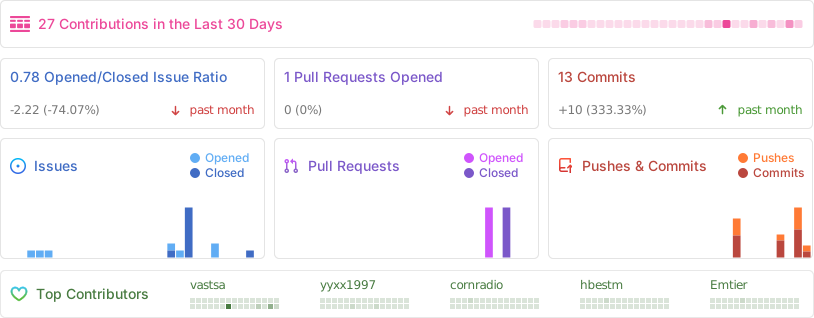
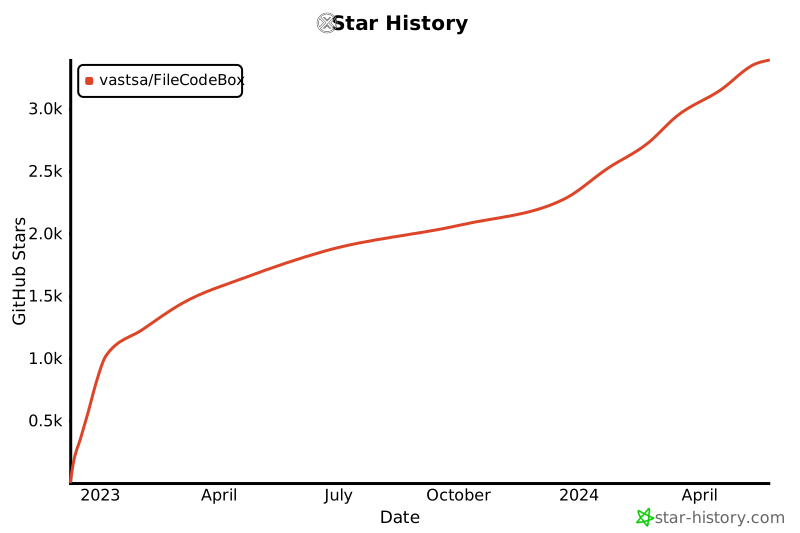
## 📊 项目统计
|
||
|
||
<div align="center">
|
||
|
||
<a href="https://hellogithub.com/repository/75ad7ffedd404a6485b4d621ec5b47e6" target="_blank">
|
||
<img src="https://api.hellogithub.com/v1/widgets/recommend.svg?rid=75ad7ffedd404a6485b4d621ec5b47e6&claim_uid=beSz6INEkCM4mDH" alt="HelloGitHub" width="200">
|
||
</a>
|
||
|
||
|
||
|
||
[](https://star-history.com/#vastsa/FileCodeBox&Date)
|
||
|
||
</div>
|
||
|
||
---
|
||
|
||
## 🗓 更新计划
|
||
|
||
- [ ] 2025 年新皮肤
|
||
- [ ] 文件收集功能
|
||
|
||
---
|
||
|
||
## 📜 免责声明
|
||
|
||
本项目开源仅供学习交流使用,不得用于任何违法用途,否则后果自负,与作者无关。使用本项目时请保留项目地址和版权信息。
|
||
|
||
---
|
||
|
||
<div align="center">
|
||
|
||
**如果觉得项目不错,欢迎 ⭐ Star 支持!**
|
||
|
||
Made with ❤️ by [vastsa](https://github.com/vastsa)
|
||
|
||
</div>
|